
Moving to the cloud is a strategic decision, not just a change in where data is stored. Organizations migrate workloads to scale resources as demand shifts, adopt cloud capabilities, or improve application performance. The right cloud migration services shape the transition around business priorities, application needs, security, and compliance. A migration may move a workload with minimal changes or redesign it to use cloud-native tools.
The potential gains are compelling, but a successful transition takes more than moving data. You need a clear plan for what to migrate, how to protect access and information, and how to keep essential operations running. This article covers why businesses move to the cloud, what the project stages involve, and how security, compliance, and cost shape the approach. You’ll get a practical framework for planning a transition that supports business needs without treating risk as an afterthought.
Key Takeaways
- Match each workload to the right migration approach, from moving it with minimal changes to adapting it for cloud-native capabilities.
- Build a migration roadmap around business goals, application and data dependencies, cost considerations, and pilot testing.
- Make access controls, encryption, monitoring, and applicable compliance needs part of the cloud design from the start.
- Plan for the work after migration, including ongoing oversight of performance, security, and cloud spending.
Why Migrate to the Cloud?
Cloud migration can give an organization greater flexibility in running applications, storing data, and supporting changing workloads. The right approach depends on what each system does and what the business needs from it.
Application and Infrastructure Migration
A migration can transfer applications, databases, storage, platforms, and infrastructure to cloud environments. For example, a data warehouse may move with its connected applications, while critical B2B communication pipelines might transition to dedicated cloud platforms like 123 EDI to streamline electronic data interchange. Map dependencies before moving workloads so teams can sequence the work, protect data, and minimize disruption. Cloud migration services can cover both the technical transfer and the decisions that shape it.
Application Discovery and Rationalization
Discovery creates an inventory of applications, databases, data warehouses, and their dependencies. Rationalization then determines which systems to migrate, modernize, combine, or retire, based on business value and technical fit. Choose a migration partner whose approach suits your systems and goals. Compare its assessment, migration planning, security, and ongoing management capabilities. AWS, Microsoft Azure, and Google Cloud offer different products, services, and pricing, so compare them against workload requirements rather than assuming one platform fits every application.
Migration Strategy Options
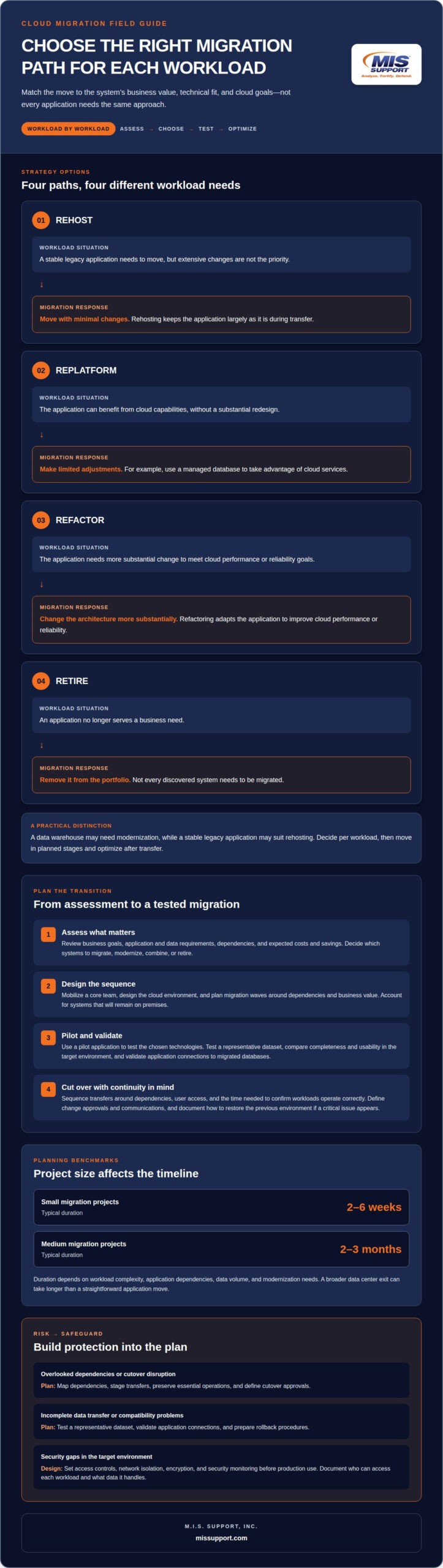
Rehosting moves an application with minimal changes, while replatforming makes limited adjustments to use cloud capabilities such as managed databases. Refactoring changes application architecture more substantially to improve cloud performance or reliability. Retiring removes an application that no longer serves a business need. Choose a strategy for each workload: a data warehouse may need modernization, while a stable legacy application may suit rehosting. Then migrate in planned stages and optimize after transfer.
Cloud migration planning, design, and project stages
Small cloud migration projects typically take 2–6 weeks; medium projects typically take 2–3 months. Key risks include overlooked dependencies, incomplete data transfers, security gaps, and cutovers that disrupt operations.
Migration Planning and Execution
Start by assessing business goals, application and data requirements, and expected costs and savings. Then mobilize a core team, design cloud environments, and plan migration waves around dependencies and business value. A pilot application tests the chosen technologies before broader execution. Include workloads that remain on premises, such as systems that need to operate alongside cloud databases.
Data Testing and Rollback Planning
Before transferring production data, test a representative dataset and compare its completeness and usability in the target environment. Validate application connections to migrated databases, then document how to restore the previous environment if testing reveals a critical issue. A pilot can expose transfer problems before they affect a wider migration wave.
Operational Continuity and Cutover
Plan cutover around application dependencies, user access, and the time needed to confirm workloads operate correctly. In a Microsoft environment, map connected services and database access before switching users to the new platform. Sequence transfers to keep essential operations available, and define who approves each change and communicates it to affected teams.
Migration Risks and Timeline
Migration duration depends on workload complexity, application dependencies, data volume, and modernization needs. A straightforward application move may take weeks, while a broader data center exit can take longer. Use staged testing, rollback procedures, and clear cutover approvals to manage transfer errors, compatibility problems, and interruptions to business operations.
Cloud security and compliance
Build cloud security into each target environment rather than adding it after workloads move. A sound strategy maps identities, data flows, and network boundaries before migration. Use identity and access management to limit privileges, network isolation to separate systems, encryption to protect information, and security monitoring to detect suspicious activity. These controls establish a consistent baseline across hybrid environments.
Cloud customers are responsible for implementing security and compliance solutions suited to their needs. For each workload, document who can access it, what data it handles, and which controls apply. Map those controls to the selected platform’s native capabilities and test them before production use. Automation can apply approved configurations consistently, helping organizations deploy efficiently while maintaining governance.
Compliance planning should start with the business’s data, contracts, and operating context. GDPR, SOC 2, and PCI DSS are examples of standards organizations may need to consider during migration; they are not interchangeable checklists. Identify relevant requirements, assign control ownership, and retain evidence showing how access, data protection, and monitoring are handled. This supports efficiency by aligning compliance decisions with architecture choices.
Cloud migrations can raise legal and regulatory questions involving contracts, data protection, law enforcement, and safeguards for sensitive domains. The Institute of Electrical and Electronics Engineers (IEEE) identifies these four areas to consider. A final review should assess each area against the target environment and migration strategy, especially when data or applications cross operational boundaries.
M.I.S. Support: Cloud Security & Migration Services
M.I.S. Support provides Cloud Security & Migration Services for organizations planning a move or strengthening an existing cloud environment. Turn to this support when migration decisions need to account for workload requirements and security risks. The service helps align cloud plans with business priorities while keeping protection central to the transition.
For ongoing risk management, Managed Cybersecurity Services and 24/7 Threat Monitoring & Response help address security beyond the migration itself. Internal & External Penetration Testing can assess defenses and identify weaknesses that need attention. Together, these offerings support a more complete view of cloud readiness, active threats, and areas for improvement.
If your organization is preparing a migration or reviewing cloud security, contact M.I.S. Support to discuss the next step.
Move Forward With a Clear Cloud Strategy
Turn migration goals into an operating plan. Identify who owns cloud decisions, how security oversight will continue after launch, and what signals will trigger a review as workloads change. This discipline helps cloud migration services support long-term resilience, not just a one-time transfer.
M.I.S. Support helps organizations strengthen their plans through Managed Cybersecurity Services and Internal & External Penetration Testing. These capabilities support ongoing risk management and help assess defenses as cloud environments evolve. Choose a next step that fits your priorities, whether you’re preparing a migration or reviewing an existing setup.
Contact M.I.S. Support to discuss your cloud security and migration needs. A deliberate plan creates a stronger foundation for what comes next.
Frequently Asked Questions
What do cloud migration services include?
Cloud migration services can include workload assessment, target-environment design, data transfer, application configuration, and post-migration validation. The scope may also cover coordinating dependencies, documenting ownership, and resolving issues found during testing. For example, a business moving a customer database and its reporting application needs both systems checked together so users can access consistent information after the transition.
How much do cloud migration services cost in the United States?
Project costs depend on the scope and are provided after a quote request. Key factors include the number and complexity of applications, data volumes, dependencies, required modernization, security controls, and migration schedule. Ongoing cloud spending is separate from migration work and depends on resource use, storage, data transfer, and operational choices. Avoid using the estimate for a single workload to budget for the entire environment.
How can businesses estimate cloud migration costs and ongoing cloud spending?
Build an estimate from an inventory of applications, databases, storage needs, and dependencies. Separate one-time migration work from recurring cloud consumption, then model expected demand and resource settings for each workload. After launch, compare actual usage with the forecast, identify idle or oversized resources, and adjust configurations. Review the estimate when workloads, architecture, or business requirements change.
What security, compliance, and data residency requirements apply to US cloud migrations?
Requirements depend on the information handled, the organization’s industry, customer commitments, and applicable contracts or frameworks. Before migration, document data types, access permissions, retention needs, and where data and backups will reside. Confirm how the chosen cloud design supports those requirements, including restrictions on data location or movement. Keep control ownership and supporting records clear for ongoing reviews.
Which cloud migration companies are best for businesses?
Choose a cloud migration company whose approach fits your systems and goals. Compare its assessment, migration planning, security, and ongoing management capabilities.