
A stolen password can turn a home office into a front door to your business. Learning how to secure remote workforce access goes beyond adding a VPN or reminding staff to watch for phishing. You need protections for identities, devices, and business data, plus clear rules for company-owned and personal equipment.
Remote employees connect from different networks, use cloud tools, and may need help recognizing suspicious activity. If no one owns an alert or employees are unsure how to report a concern, a compromised account can disrupt more than one person’s work.
This guide lays out a practical plan to strengthen sign-ins, protect devices, limit data access, train employees, and prepare for incidents. It also covers how to improve visibility across accounts and endpoints, respond consistently, and restore operations when defenses are tested.
Key Takeaways
- Learn how to secure remote workforce access by addressing connected risks across accounts, devices, data, and work locations.
- Start with an inventory of users and devices, then strengthen authentication and endpoint protection.
- Set clear expectations for updates, approved storage, screen locking, and reporting suspicious activity.
- Build a repeatable incident process with assigned alert ownership, escalation, containment, recovery, and follow-up.
How to Secure a Remote Workforce by Understanding Its Main Risk Layers
Remote-work security protects the people and technology connecting to business systems from different locations. Focus on four connected layers: accounts that establish identity, devices used for work, business data employees access, and the connections between them. A weakness in one layer can expose another, so start by mapping how users, devices, and systems interact.
For example, an employee might enter a password on a fake sign-in page after receiving a phishing email. If an attacker uses that credential to access a poorly protected device, they may also reach shared files available to the employee. The incident began with a message, but its impact can spread through account access, device weaknesses, and overly broad data permissions.
A layered security program combines identity checks, device safeguards, and controlled data access so that one failed defense doesn’t expose the whole business. That’s the core of how to secure remote workforce access: build overlapping controls rather than relying on a single tool.
Why a VPN alone does not secure remote work
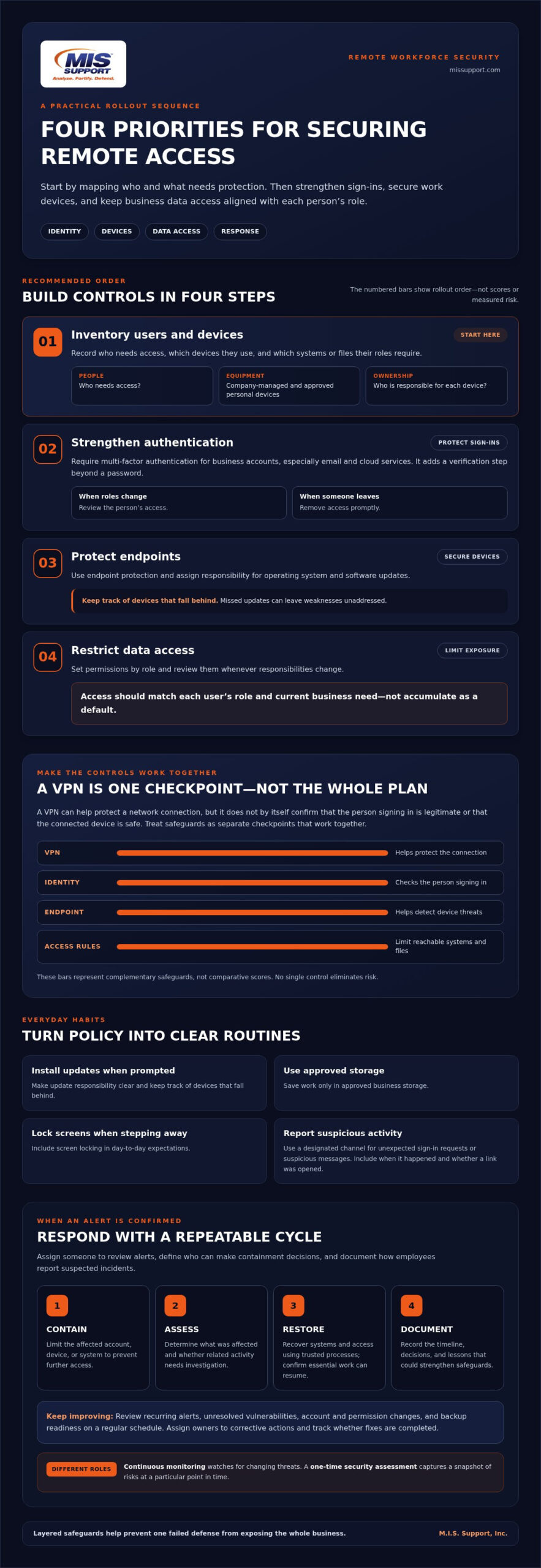
A VPN can help protect a network connection, especially when employees work outside the office. But it does not, by itself, confirm that the person signing in is legitimate or that the connected device is safe. Multi-factor authentication adds a check beyond a password. Endpoint protection helps detect threats on a device, while access controls limit which systems and files a user can reach.
Think of these safeguards as separate checkpoints, not substitutes. A VPN can secure the route, while identity and device controls help assess who and what is using it. Organizations managing their broader IT and networking hardware through providers such as genx.ae often pair reliable enterprise equipment with these layered controls. Together, they add layers of protection without treating VPNs as obsolete or expecting any one control to stop every threat.
How to Secure Remote Employees, Devices, and Business Accounts
Turn your risk picture into a rollout plan. A practical approach to how to secure remote workforce access starts with identifying what needs protection, then tightening controls in a manageable order. Assign an owner to each step so responsibilities do not fall between IT, managers, and employees.
- Inventory users and devices. Record who needs access, which devices they use, and which systems or files their roles require. Include company-managed equipment and approved personal devices, and note who is responsible for each device.
- Strengthen authentication. Require multi-factor authentication for business accounts, especially email and cloud services. Review access when someone changes roles and remove it promptly when someone leaves.
- Protect endpoints. Use endpoint protection and define who is responsible for operating system and software updates. Track devices that fall behind, since missed updates can leave weaknesses unaddressed.
- Restrict data access. Set permissions by role and review them when responsibilities change. Access should match each user’s role and current business need, not accumulate as a default.
Prioritize identity, endpoint protection, and employee readiness
Multi-factor authentication adds a verification step beyond a password. Role-based permissions limit what each account can reach, and prompt access revocation closes the door when access is no longer needed. Endpoint protection and timely patching help defend devices. Security awareness training helps employees recognize suspicious messages and report concerns. These measures reduce exposure, but no single control eliminates risk. Broader cybersecurity best practices can help align controls with business priorities.
Make employee routines specific: install updates when prompted, save work only in approved storage, lock screens when stepping away, and report unexpected sign-in requests or suspicious messages through a designated channel. Explain what information to include in a report, such as the time of the message and whether a link was opened. Clear expectations turn policy into everyday practice. Cybersecurity assessments and strategic guidance can help identify and prioritize gaps.
How to Maintain Remote Workforce Security With Monitoring and Response
Security controls need an operating rhythm. Alerts are useful only when someone owns them, understands which signals require escalation, and can investigate or bring in the right technical expertise. Assign responsibility for reviewing alerts, define who can make containment decisions, and document how employees report suspected incidents. Clear ownership helps prevent warnings from sitting unnoticed while an issue develops.
Continuous monitoring watches for changing threats; a one-time security assessment captures a snapshot of risks at a particular point in time. Both can be useful, but they serve different purposes in how to secure remote workforce operations.
When a security alert is confirmed, follow a consistent response cycle:
- Contain: Limit the affected account, device, or system to prevent further access.
- Assess: Determine what was affected, what data or services may be involved, and whether related activity needs investigation.
- Restore: Recover systems and access using trusted processes, then confirm essential work can resume.
- Document: Record the timeline, decisions, and lessons that could strengthen safeguards or response procedures.
Turn monitoring findings into resilience improvements
Response is only part of the work. Review recurring alerts, unresolved vulnerabilities, account and permission changes, and backup readiness on a regular schedule. Look for patterns, assign owners to corrective actions, and track whether fixes are completed. This turns monitoring from a stream of notifications into a practical way to reduce repeat exposure.
Businesses without round-the-clock internal security coverage can use managed cybersecurity support for continuous oversight and help prioritizing findings. M.I.S. Support provides 24/7 threat monitoring and response, alongside secure managed IT services. A cybersecurity assessment can help identify gaps, while strategic guidance helps align next steps with business needs. Learn about M.I.S. Support’s cybersecurity services.
Build Security Into What Comes Next
Remote-work security is strongest when it evolves with the business. Treat new hires, role changes, added cloud tools, and updated workflows as prompts to revisit access and ownership. When teams adopt new digital platforms or need temporary phone verification for testing and account activations, using services like SMSOkey can help keep personal employee details protected. A recurring review can help keep safeguards aligned with how your team works, rather than relying on assumptions that may no longer hold.
When operations change, review which people need access, whether their devices meet your requirements, and whether data permissions still match their roles. M.I.S. Support can help shape a security plan around your business needs.
For help strengthening remote-work security, discuss your security needs with M.I.S. Support.
Frequently Asked Questions
Is public Wi-Fi safe for remote employees to use?
Public Wi-Fi can add risk, so employees should avoid unknown hotspots for sensitive tasks when a trusted connection is available. If they must connect, use the company-approved VPN, verify the network name with the venue, disable automatic joining, and avoid file sharing. A phone hotspot can reduce reliance on a shared public network.
Can employees use personal devices to access company systems?
Yes, if the business approves the device and sets clear conditions for access. When deciding how to secure remote workforce access through BYOD, consider separating work data from personal apps, requiring device encryption and screen locks, and blocking access from devices that fall behind on updates. Define what happens to company data if an employee leaves or the device is replaced.
What should a business do first after a remote employee loses a work device?
Have the employee report the loss to the designated security or IT contact immediately, even if the device may be nearby. The response team can lock or erase a managed device, revoke active sign-in sessions, and review recent account activity. Then assess what information the device could access, reset credentials if warranted, and record actions taken for follow-up.