
Microsoft is currently the most impersonated brand in phishing attacks, accounting for 43.1% of all global attempts as of 2026. You’ve likely felt the pressure of managing microsoft 365 advanced threat protection while fearing that a single AI-generated email might bypass your firewall. It’s a high-stakes environment where a single oversight can lead to a multi-million dollar breach. We understand the weight of that responsibility and the exhaustion that comes with constant vigilance.
We’re here to replace that anxiety with strategic preparedness. This guide helps you master the core capabilities of Defender to fortify your organization against sophisticated ransomware. You’ll gain a clear understanding of the latest features, a roadmap for secure implementation, and the confidence to lead your team. Detect. Respond. Recover. Let’s build your digital resilience together.
Key Takeaways
- Understand how microsoft 365 advanced threat protection, now known as Defender for Office 365, acts as a cloud-based shield against sophisticated and unknown digital threats.
- Learn how sandboxing technology and time-of-click verification neutralize malicious files and weaponized URLs before they can impact your users.
- Identify the critical security gaps left by default out-of-the-box settings and why professional governance is essential for a robust defense.
- Build a roadmap for proactive security that transforms your organizational posture from reactive anxiety to strategic readiness.
Decoding Microsoft 365 Advanced Threat Protection in the Modern Threat Landscape
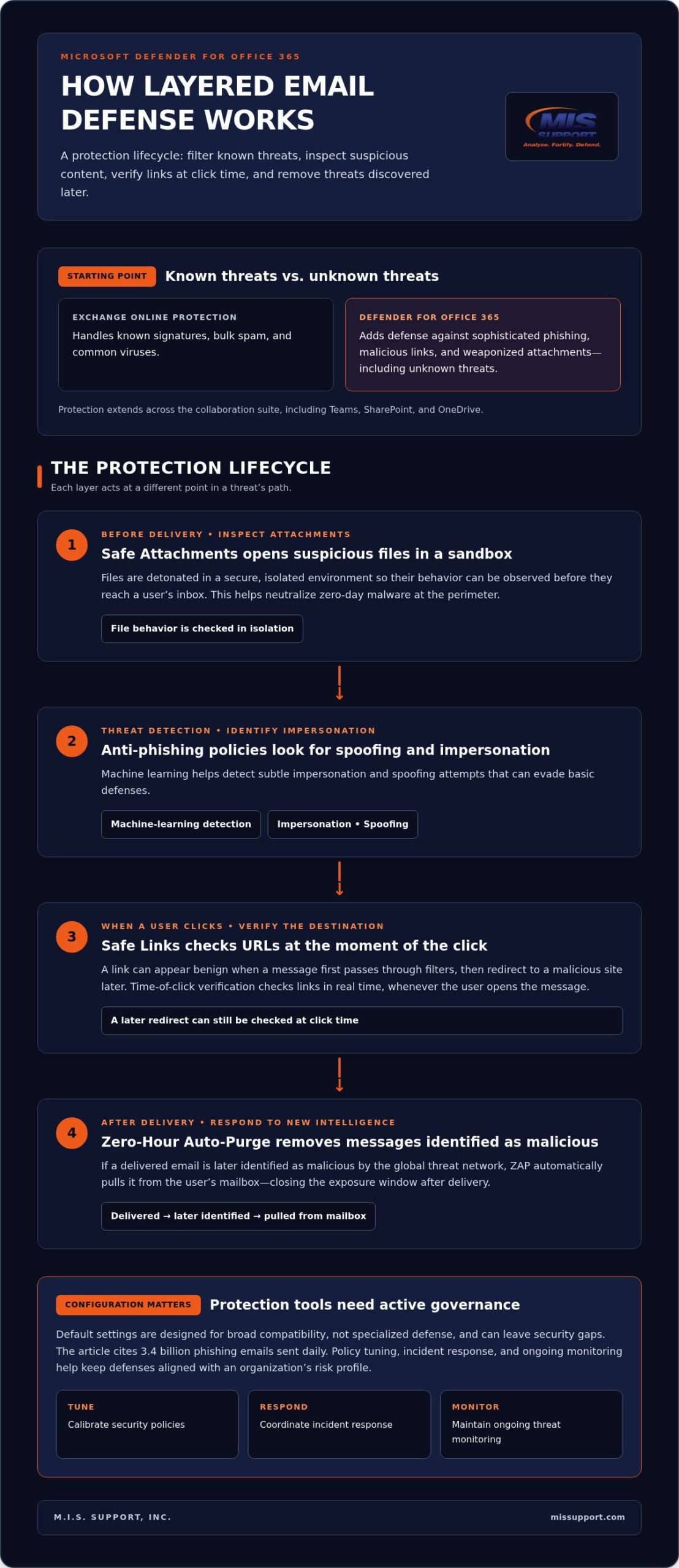
Digital threats don’t wait for your team to catch up. In 2026, microsoft 365 advanced threat protection stands as the frontline defense against an increasingly hostile digital environment. It’s a cloud-based filtering service designed to intercept what traditional defenses miss. While standard Exchange Online Protection (EOP) handles known signatures, bulk spam, and common viruses, this advanced layer hunts for the “unknown.” It targets sophisticated phishing, malicious links, and weaponized attachments across your entire collaboration suite, including Teams, SharePoint, and OneDrive.
This technology forms a critical pillar of managed cybersecurity services. Tools alone provide a false sense of security. Real resilience requires a proactive strategy that combines AI-driven detection with professional oversight. This ensures your organization remains unphased by zero-day exploits that bypass static defenses. It’s about moving from reactive patching to a stance of strategic readiness.
From ATP to Defender: Understanding the 2026 Security Evolution
The nomenclature has shifted, but the core engine has only grown more powerful. Microsoft rebranded ATP to Microsoft Defender for Office 365 to align with the broader Microsoft Defender brand ecosystem. This isn’t just a cosmetic update; it’s a strategic consolidation into the Extended Detection and Response (XDR) framework. By integrating with the wider Defender suite, the service provides unified visibility across the national enterprise. It connects email signals with endpoint data and identity alerts. This holistic approach allows for:
- Automated threat correlation across multiple attack vectors.
- Rapid, coordinated cross-domain response to active breaches.
- Comprehensive administrative oversight and unified reporting.
Modern defense requires this level of synchronization. It neutralizes attackers who exploit the gaps between siloed tools. Understanding this evolution is the first step toward building a resilient, battle-hardened infrastructure.
Fortifying Your Environment with Safe Links and Safe Attachments
Security isn’t a static wall; it’s an active hunt. Within the framework of microsoft 365 advanced threat protection, Safe Attachments provides a critical layer of sandboxing technology. It doesn’t just scan files. It detonates them in a secure, isolated environment to observe their behavior before they ever reach a user’s inbox. This proactive stance ensures that zero-day malware is neutralized at the perimeter. For deep technical details on policy configuration, the Microsoft Defender for Office 365 official documentation offers comprehensive guidance for security administrators.
Safe Links addresses the growing trend of URL weaponization. Attackers often send benign links that they redirect to malicious sites only after the email has bypassed initial filters. By providing time-of-click verification, this feature protects users in real-time, regardless of when they open the message. Parallel to this, anti-phishing policies leverage machine learning to detect subtle impersonation and spoofing attempts. However, even the best tools fail if your environment is misconfigured. Understanding what is a vulnerability assessment is vital for identifying these hidden weaknesses before attackers do. If you’re unsure about your current posture, our team can help you evaluate your security settings today.
Implementing Zero-Hour Auto-Purge (ZAP) for Dynamic Defense
Threat intelligence is constantly evolving. Zero-Hour Auto-Purge (ZAP) acts as a retroactive guardian. If an email is delivered and later identified as malicious by the global threat network, ZAP automatically pulls it from the user’s mailbox. This dynamic defense is essential for organizations that cannot afford a single second of exposure to a live threat. It closes the window of opportunity for attackers; it ensures your defense remains “on” even after delivery.
Beyond the Dashboard: Why Managed Configuration Outperforms Default Security
Default settings are built for broad compatibility, not specialized defense. This is the “Default Trap.” Standard out-of-the-box configurations often leave significant security gaps because they’re tuned to minimize user friction rather than maximize resistance. Threat actors move with terrifying speed. They adapt their techniques faster than static software updates can deploy. Relying solely on microsoft 365 advanced threat protection defaults leaves your organization vulnerable to the 3.4 billion phishing emails sent daily. It’s a risk that modern enterprises can’t afford to take.
Achieving true operational resilience requires a shift from “set and forget” to active orchestration. This level of oversight is the hallmark of strategic virtual CISO services. Expert leadership ensures your security posture is dynamic, observant, and decisive. By merging professional 365 management with 24/7 threat monitoring, we create a holistic defense. We identify, we analyze, and we neutralize threats before they escalate into breaches. This proactive movement transforms your digital environment into a fortified stronghold.
The Role of a Managed Security Partner in 365 Governance
A dedicated security partner serves as a battle-hardened strategist for your digital environment. We take command of policy tuning and incident response. This eliminates the alert fatigue that often paralyzes internal IT teams. Our role is to ensure your defenses are always “on” and properly calibrated to your specific risk profile. Resilience is a continuous journey, not a destination. We provide the tireless discipline needed to maintain a secure perimeter. This partnership transforms your security from a technical burden into a strategic asset that supports long-term growth.
Secure Your Perimeter for the Challenges of 2026
Digital threats in 2026 require more than just software; they demand a battle-hardened defense. We’ve explored how microsoft 365 advanced threat protection serves as a critical shield, yet its effectiveness depends entirely on precise orchestration. Default settings often leave doors unlocked for sophisticated actors. By moving beyond the dashboard and implementing proactive tuning, you transform a tool into a fortress. It’s about moving from a state of vulnerability to one of strategic readiness.
True resilience is a continuous mission. It requires the watchful eye of a vigilant guardian to stay ahead of AI-generated phishing and ransomware. We provide 24/7 Vigilant Monitoring, Strategic Security Gap Assessments, and Battle-Hardened Defense Strategies to ensure your organization remains unphased. Don’t leave your security to chance. Fortify your organization with Managed Microsoft 365 Security from M.I.S. Support. Your stability is our duty; we’re ready to stand as your expert ally.
Frequently Asked Questions
Is Microsoft 365 Advanced Threat Protection included in my current license?
Yes, depending on your subscription tier. As of July 1, 2026, Plan 1 is included in Microsoft 365 E3 and Business Standard subscriptions. It’s also a standard component of Business Premium and E5 licenses. Organizations on other plans can add microsoft 365 advanced threat protection as a standalone service. This ensures that essential security layers are accessible, integrated, and active across your national enterprise.
How does Safe Links protect my employees when they are off the corporate network?
Safe Links provides continuous protection regardless of a user’s location. It functions by wrapping every URL in a secure proxy. When an employee clicks a link on a home network or mobile device, the system performs a real-time, time-of-click verification. If the destination has been weaponized since delivery, the access is blocked immediately. This maintains your defensive perimeter everywhere, always.
Can Microsoft ATP stop ransomware before it encrypts our files?
It acts as a primary interceptor. By using Safe Attachments, the system detonates suspicious files in a secure sandbox to identify malicious behavior before delivery. This proactive isolation prevents ransomware from ever reaching your endpoints. Combined with AI-driven behavioral analysis, microsoft 365 advanced threat protection identifies, isolates, and neutralizes encryption attempts at the point of entry. It’s a critical layer in your ransomware defense.
What is the difference between Plan 1 and Plan 2 of Defender for Office 365?
The distinction lies in response and automation. Plan 1 focuses on core prevention through Safe Links, Safe Attachments, and anti-phishing features. Plan 2 includes all Plan 1 capabilities plus advanced investigation tools. It provides Threat Explorer for hunting, Attack Simulation Training for users, and automated incident response. Plan 2 transforms your security posture from a protective shield into an active, automated hunting platform.